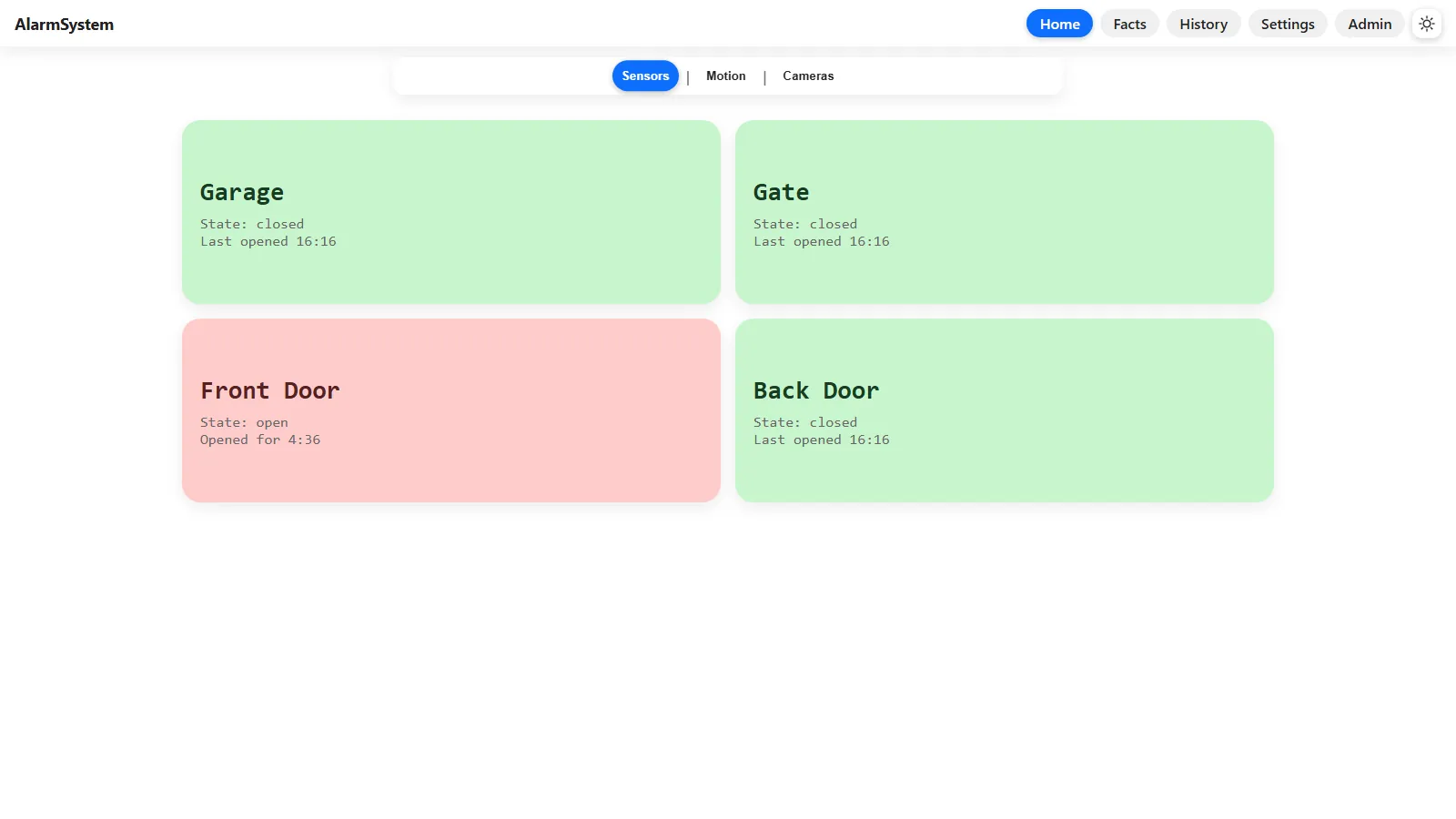
This home alarm grew from a 2020 Raspberry Pi experiment with my dad into a custom Pygame console and, later, a remotely accessible web system. The first version decoded the indicator lights on an inexpensive RF alarm panel; the current version separates sensors, data, motion, cameras, audio, notifications, and the web interface into independent services connected by a JSON-over-TCP protocol. This page follows that evolution, including the long-runtime failure that forced me to rethink how the system stored state.
Version one: reading the alarm panel
The project started around 2020 when my dad and I opened an inexpensive RF alarm panel and soldered leads onto the LEDs it used to show its wireless door-sensor states. A Raspberry Pi with a Pi-Plates TINKERplate sampled four analog channels for the garage, gate, back door, and front door. Instead of replacing the panel, the program learned to interpret the hardware that was already there.
The decoder classified voltage ranges as no power, LED off, or LED on. It also counted the panel's blinking pattern over a 15-second window so it could distinguish a genuinely open sensor from a finicky one. Relays let the Pi silence the panel's native beeper or briefly interrupt its power for a reset. The embedded version notes show email alerts, daily rotating logs, mode-specific audio, Wi-Fi failure handling, and motion detection arriving between August 2020 and August 2021.
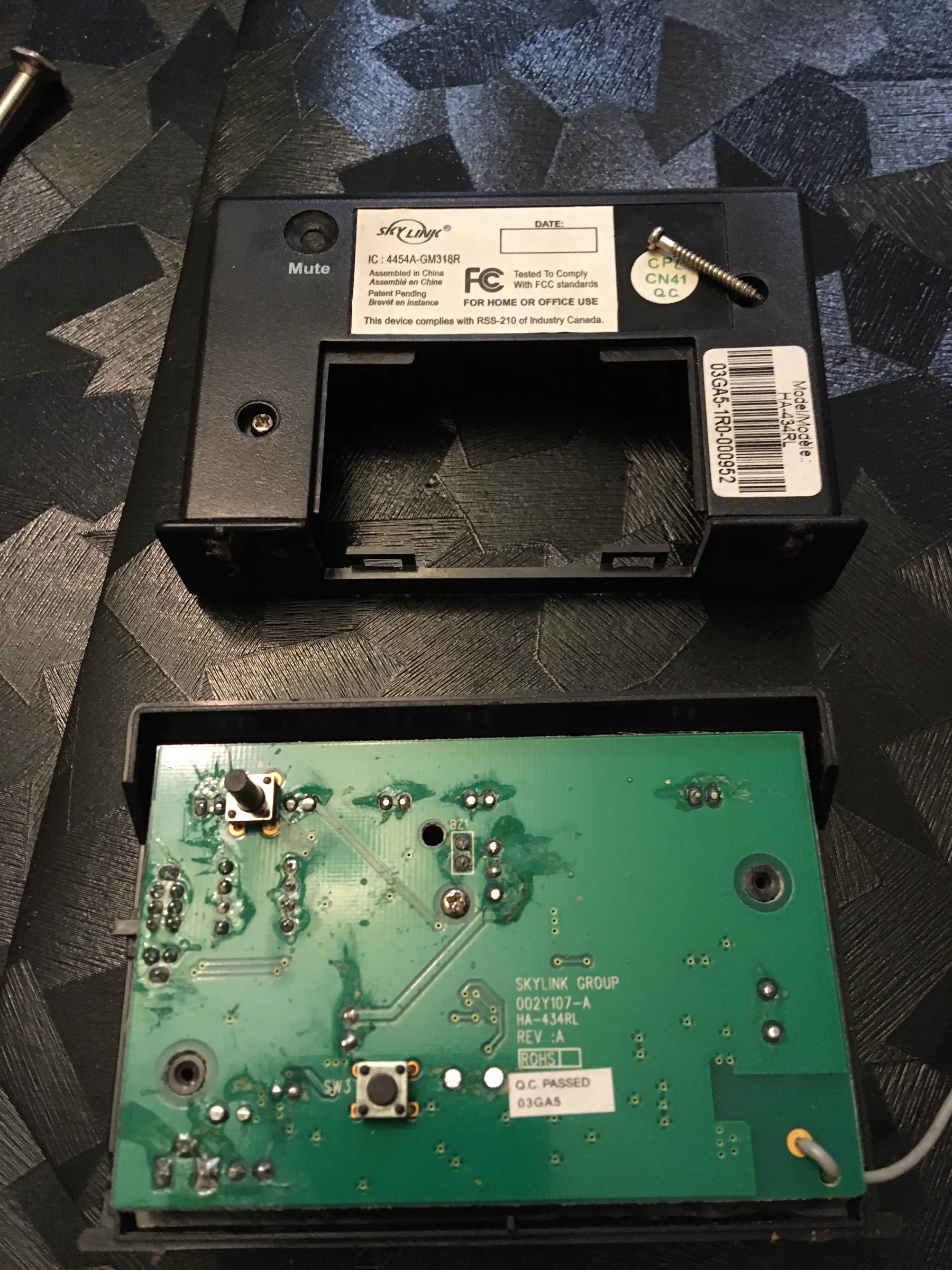
The inexpensive RF alarm panel opened on the workbench before the status-light signals were brought out to the Raspberry Pi. 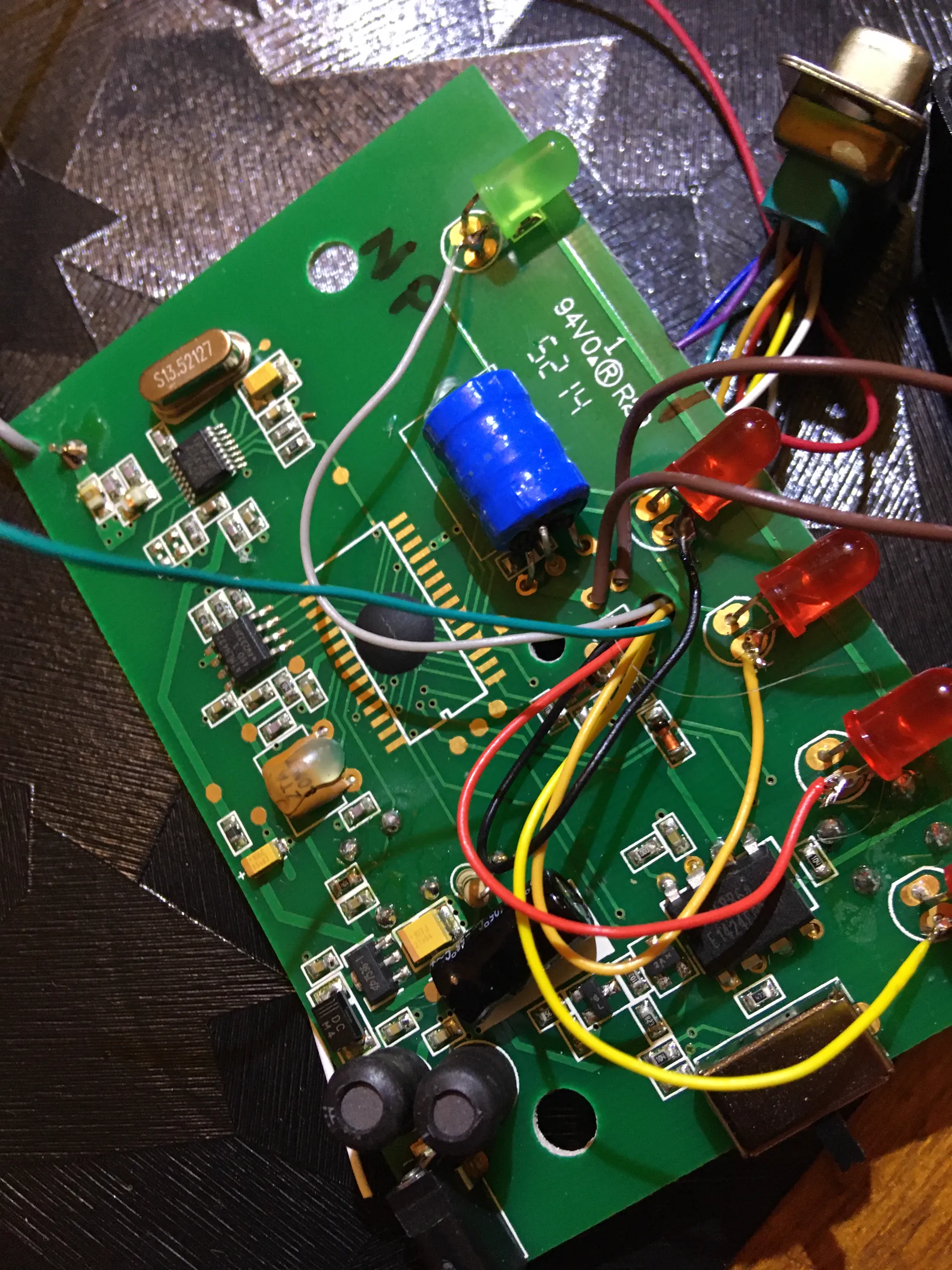
The key hardware hack: leads soldered into the panel's indicator-light circuitry so the software could observe the four sensor states. 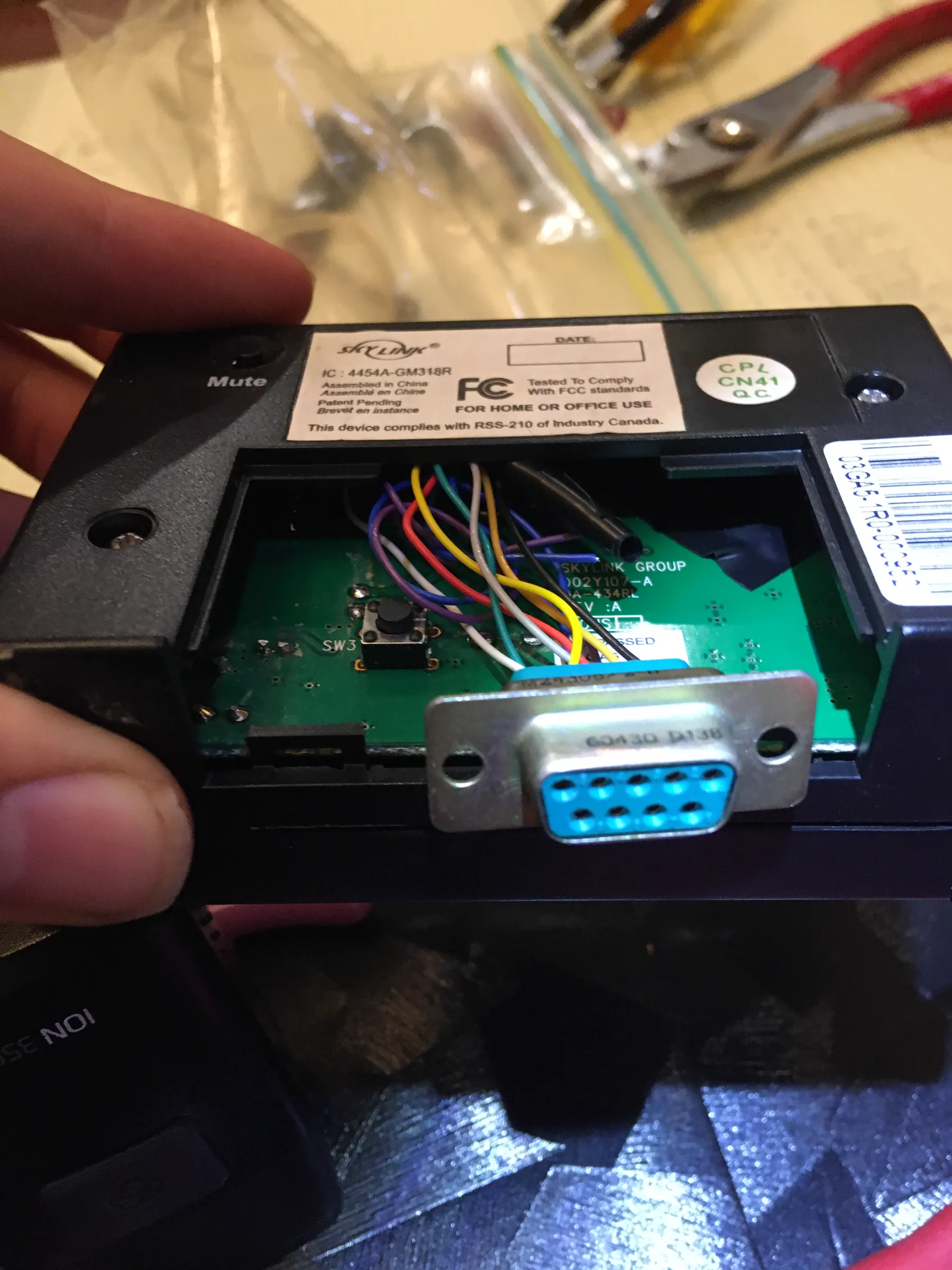
The added connector kept the modified panel self-contained while giving the external interface a clean place to attach.
From the panel's LEDs to named sensor states
The early photos and videos show the whole idea more clearly than a diagram can. We kept the alarm panel as the RF receiver, tapped the signals it already displayed through its LEDs, routed those lines through a connector in the case, and built the Raspberry Pi-side interface around an expansion board, relays, and a small breadboard. The software then turned voltage levels and blink patterns into the garage, gate, back-door, and front-door states used everywhere else in the system.
These are raw iPhone tests from July 2020, not a later recreation. The first clip checks the existing wireless sensor at the garage door. The second captures the modified panel changing its own indicator lights on the bench. The last places that hardware beside the running decoder, showing the physical alarm state reaching the program as readable output.
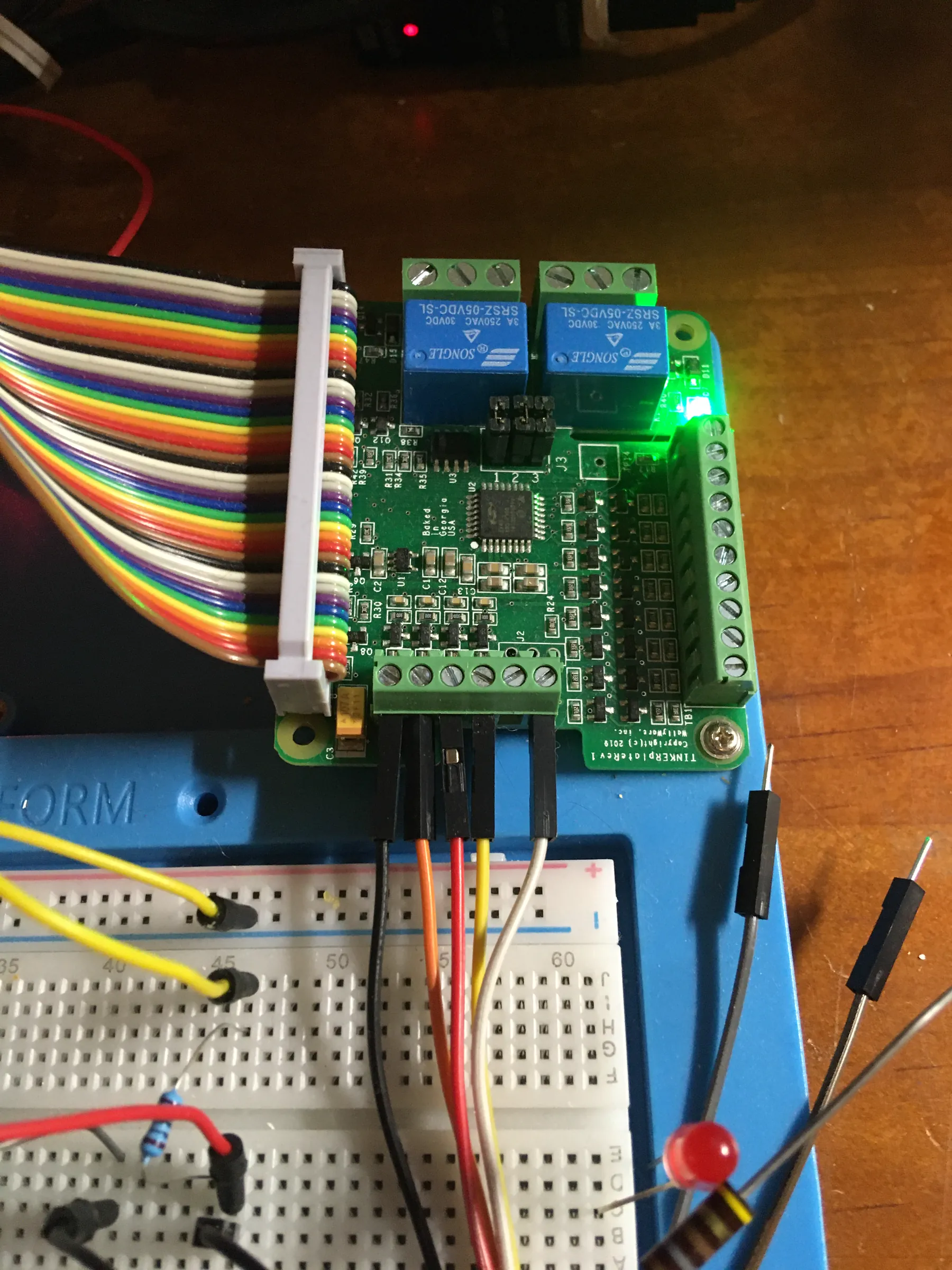
The early Pi-side bench setup used an expansion board, relay channels, a ribbon cable, and a breadboard indicator while we worked through the hardware interface. Testing the existing wireless garage-door sensor in place before following its state through the rest of the system. A bench test of the panel's original status display—the signals the Raspberry Pi interface was built to read. An early end-to-end test with the physical panel in front of the live decoder output.
Version two: a completely custom Pygame console
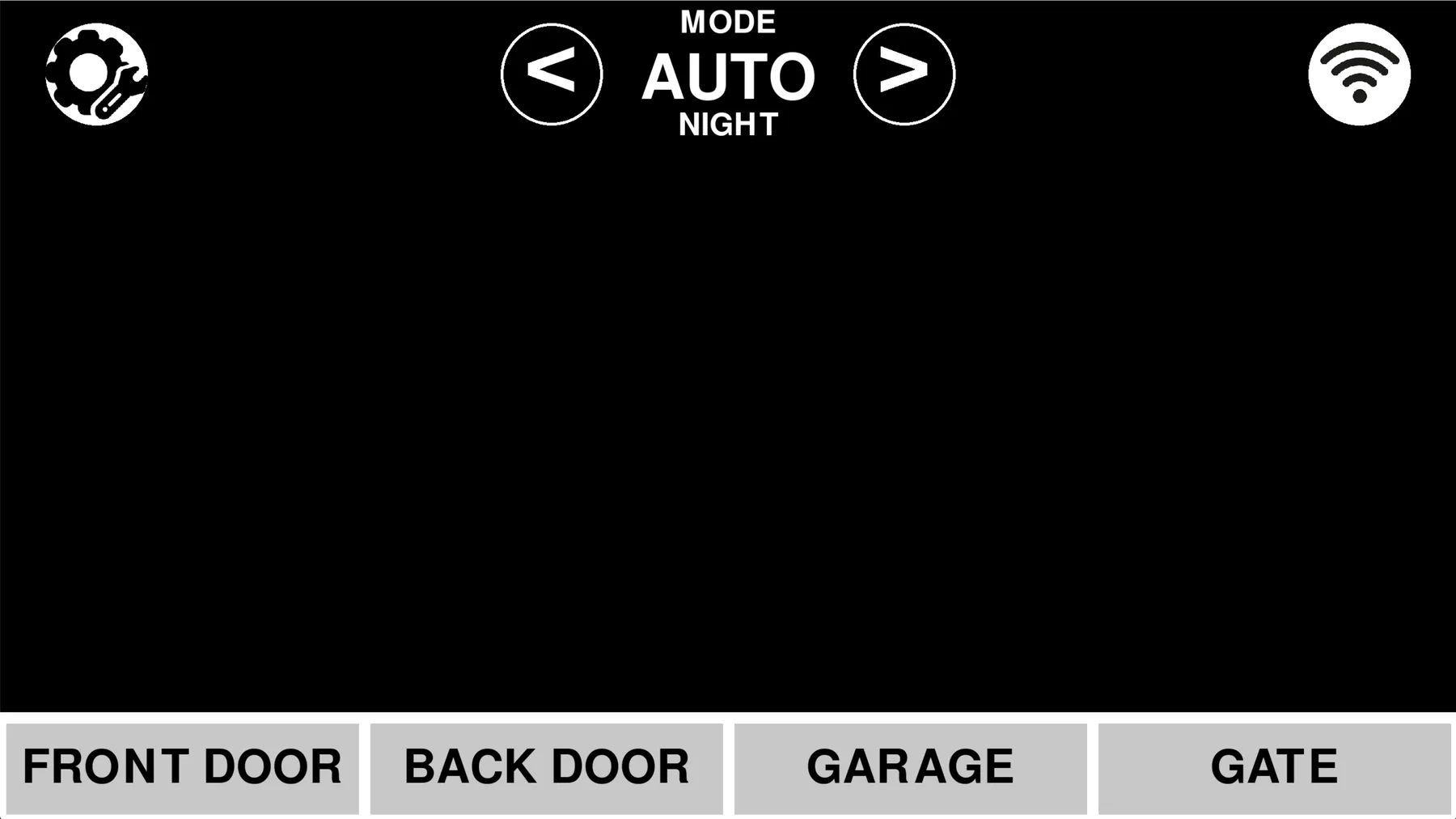
In August 2022 I turned the script into a full-screen control panel built entirely with Pygame, without AI assistance. Every panel, button, arrow, translucent overlay, line, label, and light/dark state was drawn with reusable Pygame primitives. Building those layout helpers taught me far more than simply following a tutorial would have: I was effectively making a small UI toolkit inside a game library.
The home screen combined the current mode, automatic day/night state, Wi-Fi and power indicators, four large sensor tiles, settings access, and a screen saver intended to reduce burn-in on an always-on display. The archived hardware calls are disabled on this PC, but the interface itself still runs under its original Python 3.9 and Pygame 2.1.2 environment.
Modes, settings, locks, and statistics
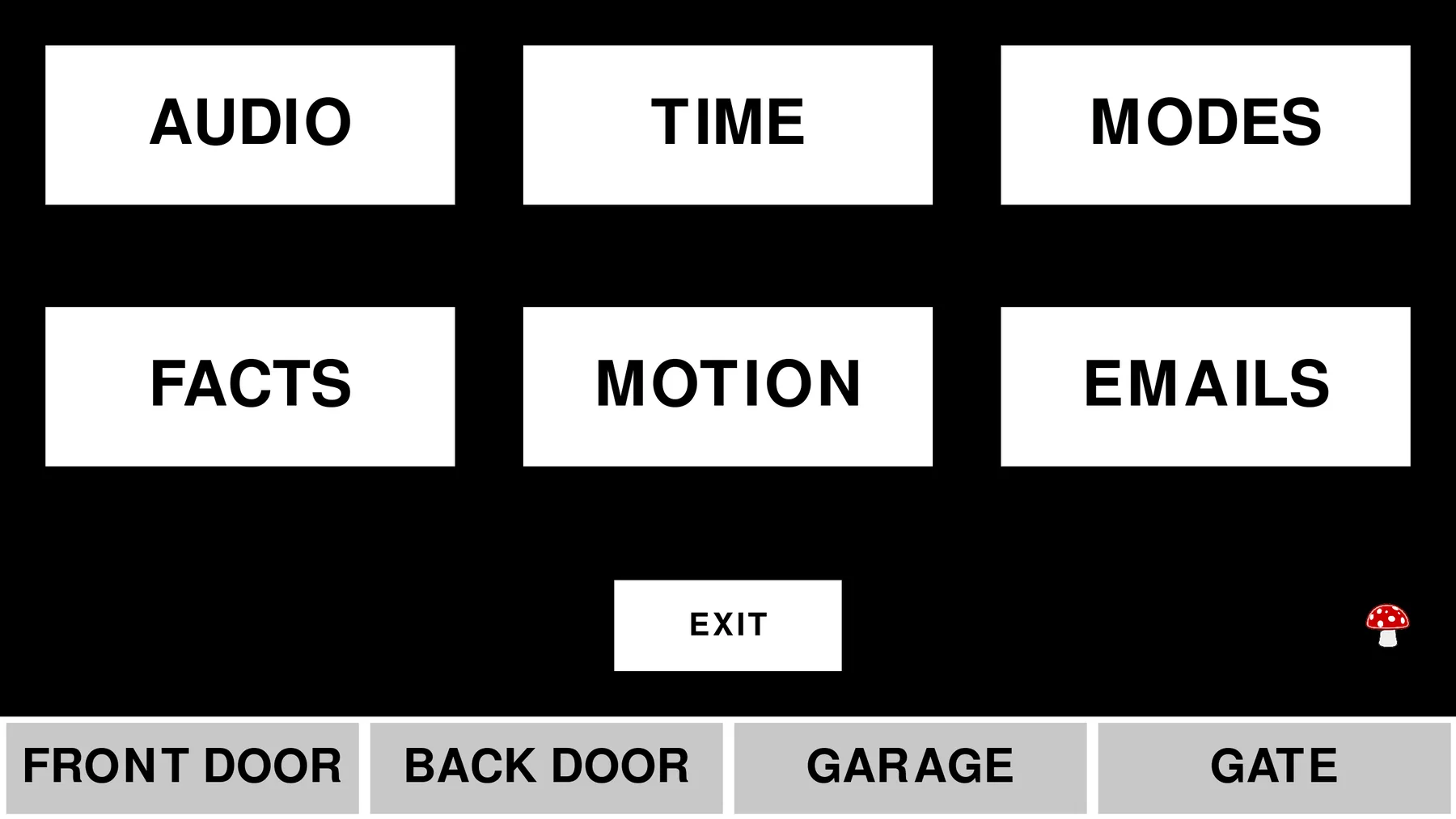
HOME, NIGHT, OUT, and AWAY could each enable a different combination of messages, periodic status updates, motion alerts, voice, chimes, reminders, and other audio. AUTO selected HOME or NIGHT from configurable start times. Separate pages controlled master and category-level audio, screen and settings timeouts, motion-recording duration, notification cadence, and per-recipient email or SMS preferences.
The settings hub also included PIN-protected administrative areas and a facts page. It tracked total and daily openings for each sensor, time spent open, average openings per day, average open duration, and finicky detections. The small mushroom in the corner was a deliberately playful hidden exit control.
The failure that changed the design
The Pygame version ran continuously on a Raspberry Pi, but after roughly a week or two it could exhaust resources and crash. I remembered the failure as an ever-growing list of alarm states. The surviving snapshot does not contain that exact unbounded list: its sensor, status, and blink arrays stay fixed at four entries. It does, however, run its main render loop with the 60 FPS limiter commented out and repeatedly reread small text files throughout that loop, so the precise trigger cannot be proven from this archive alone.
Debugging a failure that only appears after days of uptime was an important lesson. The current design makes the intended safeguards explicit: service change buffers use bounded deques, log files rotate nightly with retention limits, and one data service owns persistent writes. That experience changed how I think about queues, logging, resource ownership, and testing software meant to run indefinitely.
Version three: a network of services
The 2025 rebuild moved the interface to Flask and split the system into independently testable processes. I arrived at the shape by separating each responsibility and solving the communication problems as they appeared, before I had formally learned to call the result a microservice architecture. I did use ChatGPT while developing this generation; the earlier Raspberry Pi and Pygame versions were human-led.
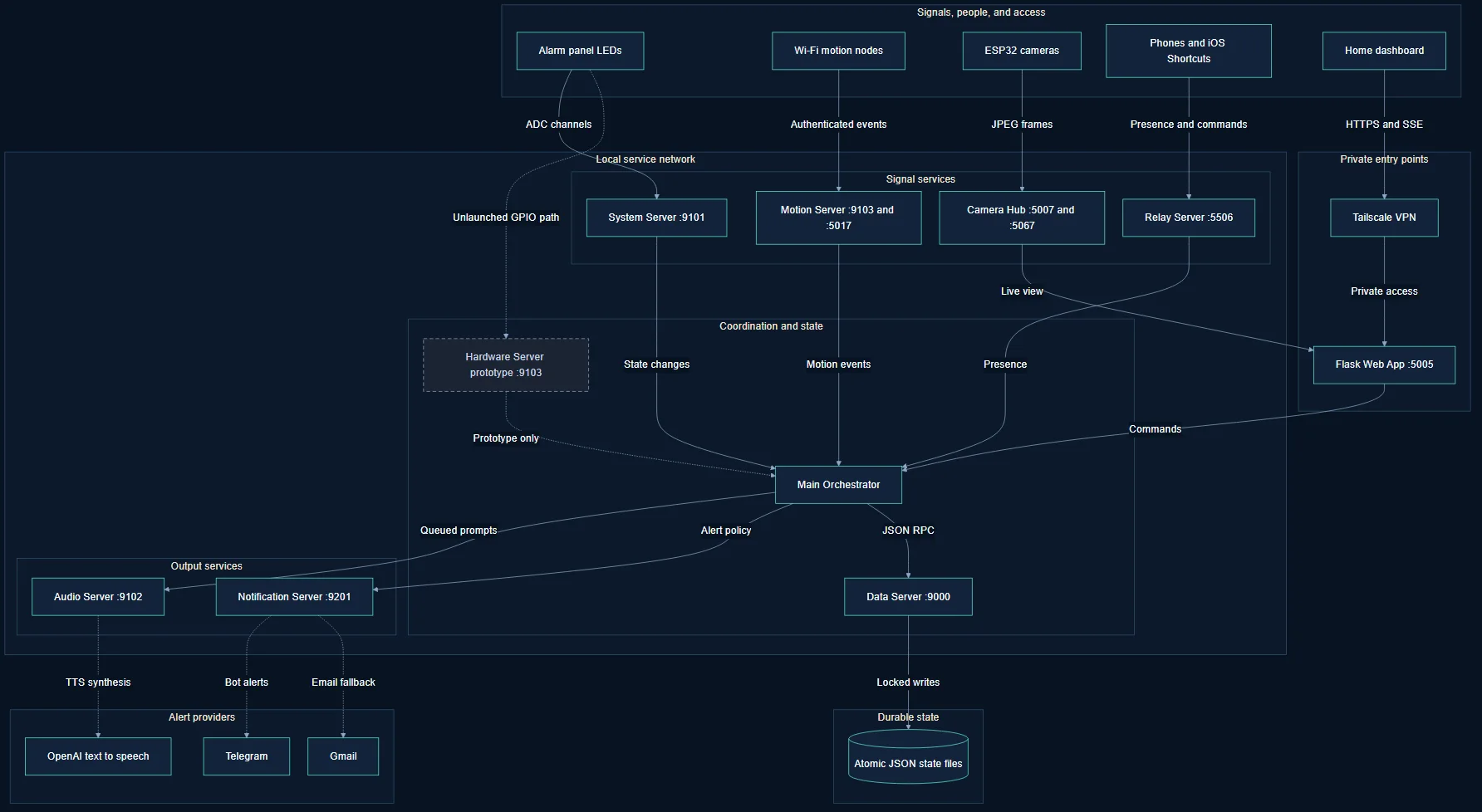
The main orchestrator starts the stack, waits for readiness, polls each service at an appropriate cadence, resolves AUTO into the active HOME or NIGHT policy, and routes events to audio and notification behavior. The hardware-server prototype remains in the source but is not started, and its default port currently collides with the motion server; the diagram marks that unfinished edge with an asterisk.
The services
The Data Server is the only process that reads and writes the JSON store, using locks and atomic replacement. The System Server polls ADC voltages, applies the legacy blink-state algorithm, updates facts, and controls reset and beeper relays. The Audio Server serializes sound and speech requests through a playback queue and caches generated TTS. The Motion Server accepts bearer-authenticated Wi-Fi sensor posts, opens an event, extends it with new triggers, and closes it after an idle timeout followed by a cooldown.
The Relay Server combines device-presence tracking with an HTTP bridge for iOS Shortcuts. The Notification Server handles Telegram commands and alerts with Gmail fallback. The Camera Hub accepts JPEG frames from ESP32-class devices, keeps only a short bounded frame buffer, watches liveness, and exposes an MJPEG viewer. Finally, the Flask app combines that state into the dashboard, facts, history, settings, and administrator pages.
request
{
  "clientName": "MAIN->SYS",
  "clientCode": "…",
  "endpoint": "get_state",
  "body": {}
}

response
{
  "status": "ok",
  "endpoint": "get_state",
  "body": { "alarm": { "sensors": { "…": "…" } } }
}
A web dashboard for a physical system
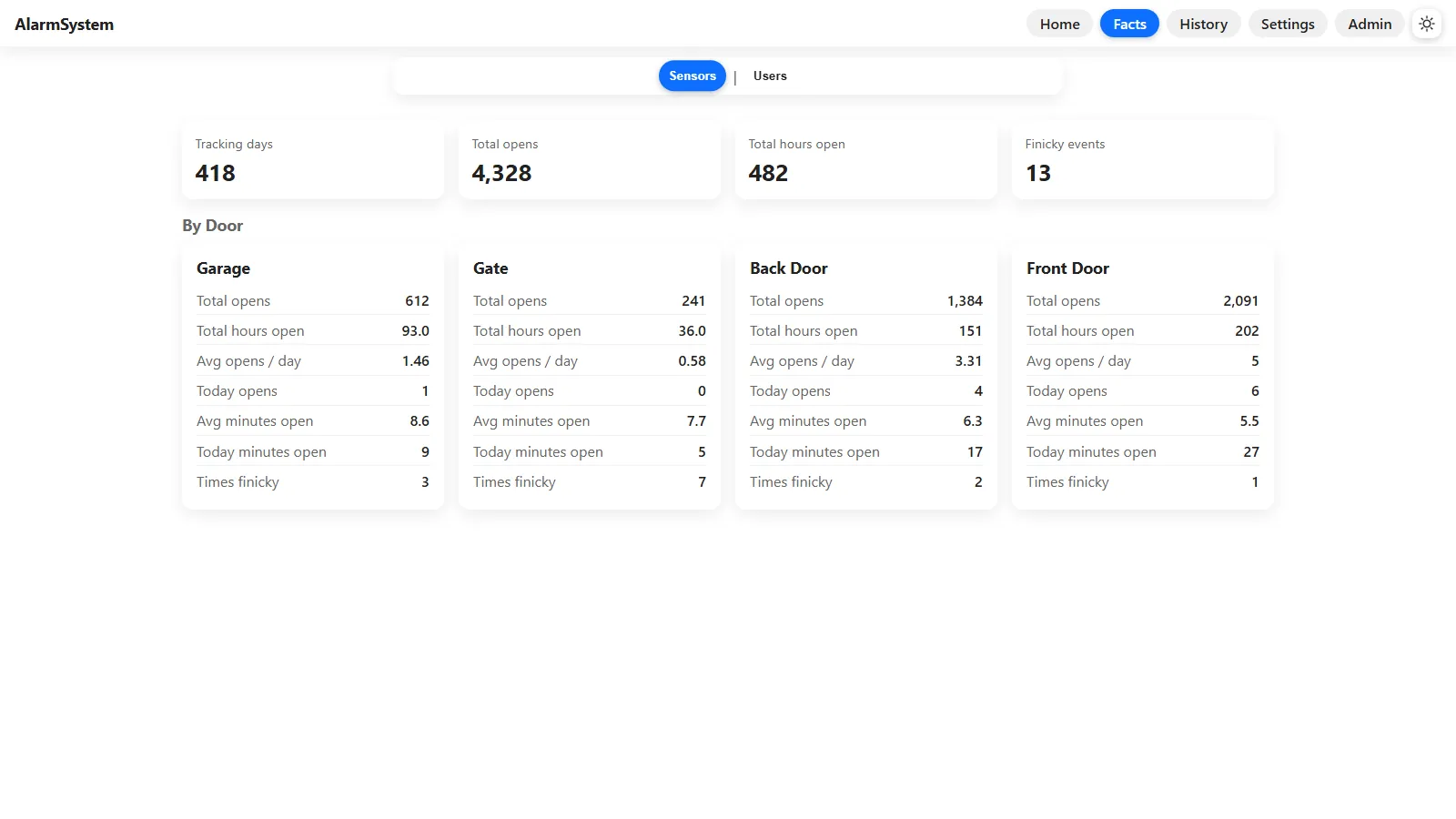
The browser interface preserves the glanceable four-sensor layout while making the system usable from laptops and phones. Closed sensors are green, open sensors are red, and live updates arrive without a page refresh. A separate facts view turns the long-running history into totals and per-door averages instead of forcing someone to interpret raw logs.
Settings expose the selected operating mode, audio categories, the AUTO schedule, per-mode alert toggles, screen behavior, light/dark themes, security controls, and Telegram preferences. The history page can display event, motion, and system logs as a chronological timeline or grouped view, with filters and downloads.
Device approval and private remote access
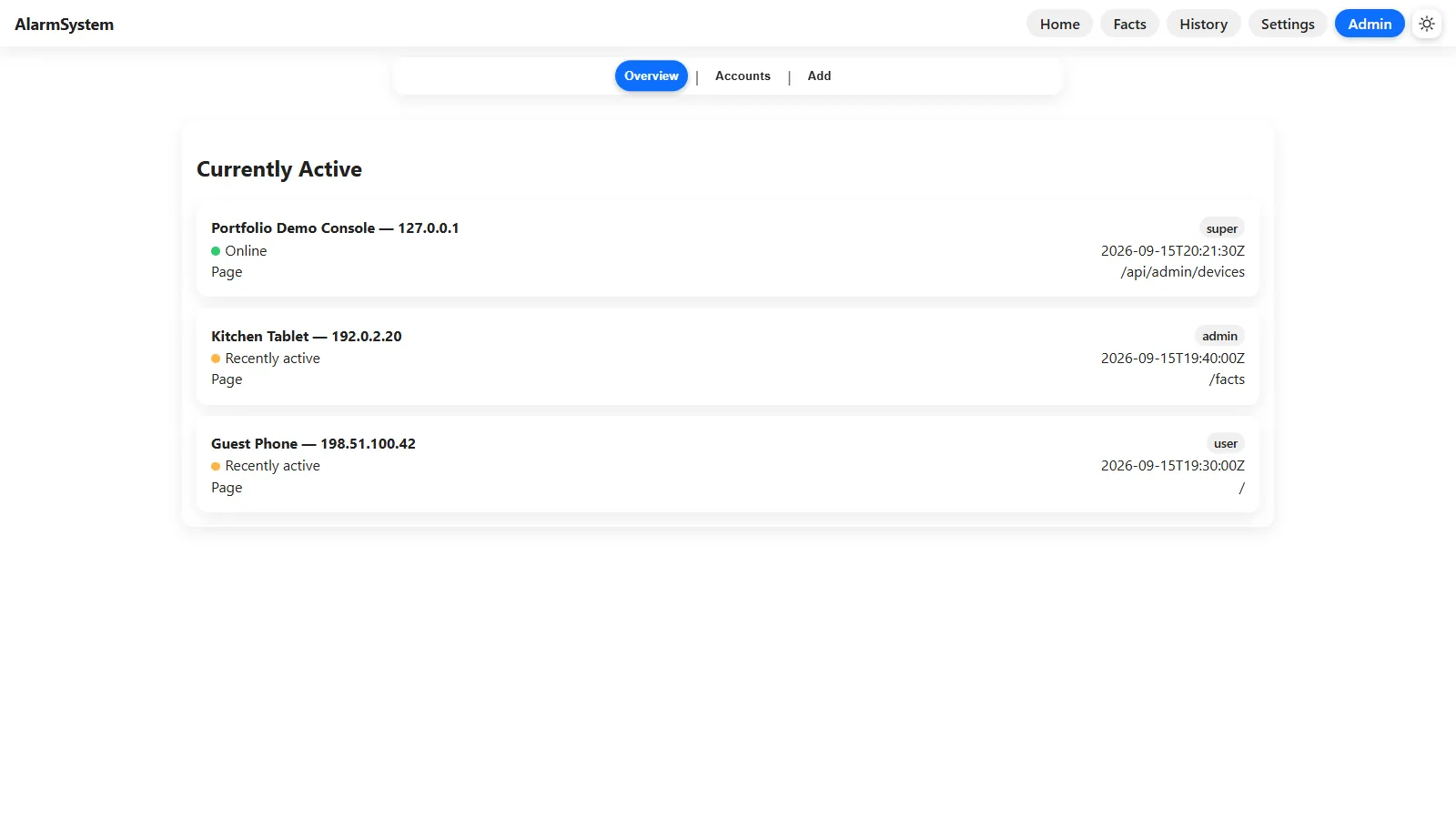
Access is tied to the requesting device's IP address. A new address is recorded as pending; from the administrator console, a super user can name it and grant user, admin, or super access. The console also shows which approved devices are online or recently active, what page they last visited, their Telegram mapping, and controls for creating or editing accounts.
At home the site is served on the local network. Tailscale extends that private network so the same dashboard can be reached remotely through a VPN without publishing it as a public website. The current implementation trusts the forwarded client-IP header, which is acceptable only behind a trusted proxy and is one of the security boundaries I would harden before treating the design as a general-purpose product.
Motion, cameras, and notifications
Wi-Fi motion nodes authenticate with a per-device code, then report activity to the ingest server. The server treats the first trigger as the start of a session, extends the deadline for later triggers, automatically closes an idle session, and waits through a cooldown before starting another. Camera nodes follow a similar enrollment idea: an ESP32 can send JPEG frames to the hub, which reports frame rate and up/down state while serving the latest frames to the dashboard.
Telegram was the most practical remote-control and alert channel to set up, so the system can apply each account's choices for door, motion, critical, status, and reminder messages. Gmail provides a fallback. Locally, the audio service can queue sound effects or cached voice announcements so two events do not talk over one another.
Where I would take it next
The original sensors were physically wired into one Raspberry Pi through the alarm panel. The newer architecture makes it possible to add Wi-Fi sensor nodes built from Raspberry Pi Picos and camera nodes built from ESP32 hardware, extending coverage without running every signal back to the same board.
If I rebuilt the transport today, I would evaluate Redis for shared state and queues or Kafka for durable event streams instead of maintaining every protocol primitive myself. Even so, writing the TCP framing, retrying clients, bounded queues, data ownership, and service supervision by hand made the reasons for those tools concrete rather than theoretical.