CalCardo was my first major full-stack project that I took from an idea to a production deployment. I built it to make keeping a real calendar feel easier: I could type a request, upload a syllabus, or let it find an event in Gmail, review what it proposed, and then push the accepted change to Google Calendar. The frontend is React and TypeScript with Tailwind CSS, the API is FastAPI and Python, and Supabase handles authentication, Postgres data, and storage.
Why I built it
I first had the idea during my first year at RIT. Campus events were scattered across email, different apps, and other sources, so it was easy to miss something. I wanted one place that could collect those events and keep me caught up.
I also wanted calendar entry to feel less like a chore. Instead of opening Google Calendar and filling out a form, I wanted to type something like, "Get lunch with Jack next Tuesday at one," or upload a syllabus with important dates and let the app prepare the events for me.
What it could do
CalCardo had three main ways to create an event: a normal event form, CalChat, and a Gmail pipeline. After signing in, a user could connect Google Calendar, choose which calendar CalCardo should write to, and pull existing events into the app. Changes made in CalCardo could then be written back to Google Calendar.
The demo shows the full flow with real calendar data. I import events, edit an existing lunch, ask the chat to move it, create two new plans at once, create and later change a recurring swimming event, and confirm the results in Google Calendar.
Gmail was a separate connection. When a likely event arrived by email, the app filtered it, extracted the date, time, location, and description, and placed a proposed event in an inbox. The user could inspect the original email, edit the proposal, ignore it, or accept it onto a chosen calendar.
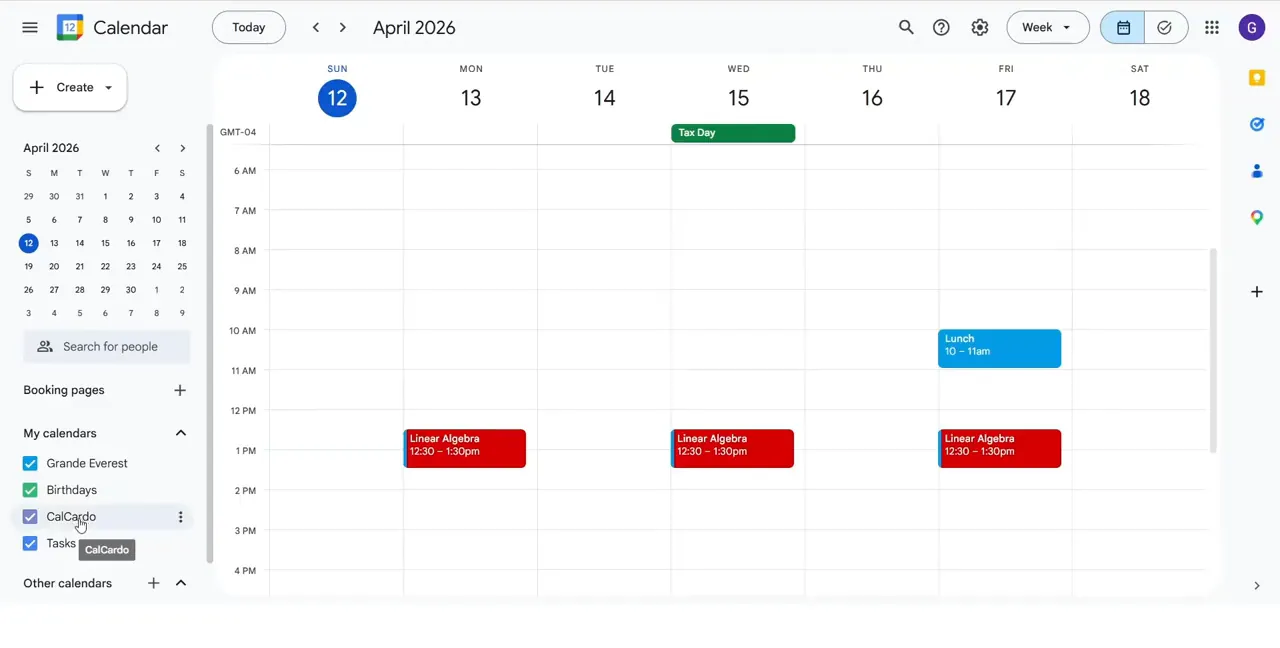
The linked Google Calendar supplied the existing schedule that CalCardo could import and reason over. 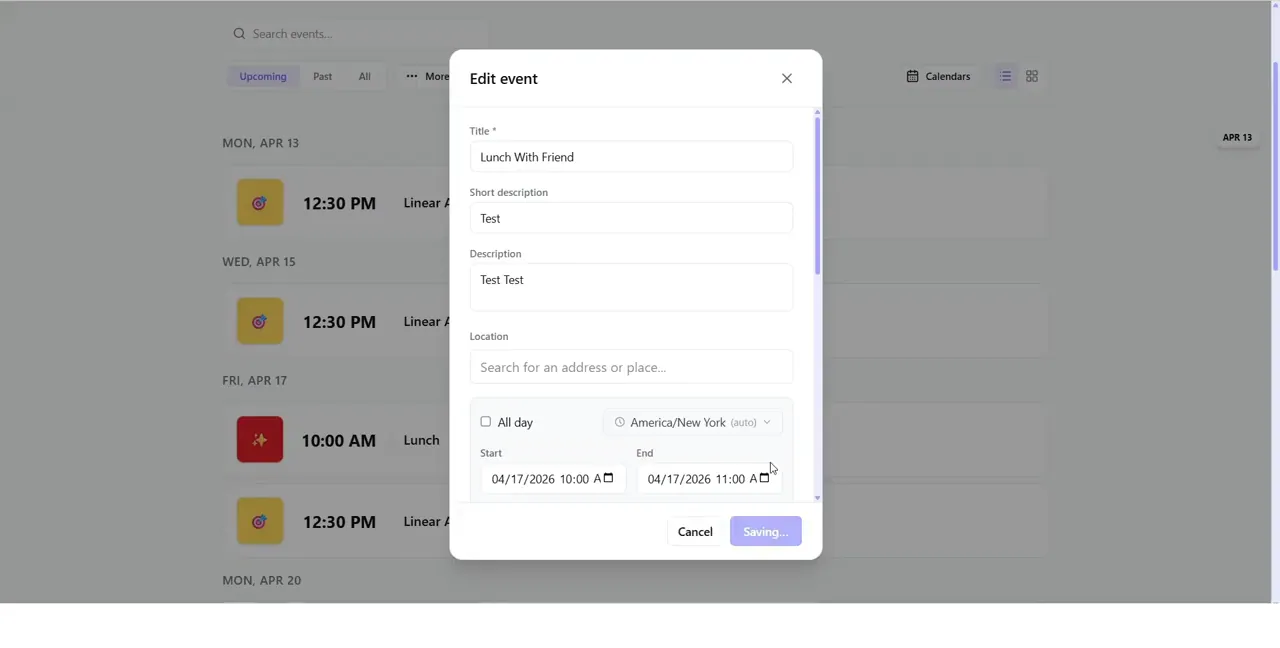
The CalCardo event editor exposed both its own display fields and the date, time, visibility, recurrence, and calendar data needed for Google synchronization.
CalChat was a proposal system, not just a chatbot
The assistant received a limited snapshot of the user's real schedule instead of pretending it knew the entire calendar. Its response had to follow a structured JSON contract that separated existing event references, edits, removals, and new event drafts. That structure let the interface show the right action for each result.
The backend validated event IDs against the snapshot the model had actually seen, checked new drafts for time conflicts, and asked the user to clarify when more than one event matched. The model could suggest an action, but the user still had to apply or accept it. That review step was important because a calendar assistant should not silently change a real schedule.
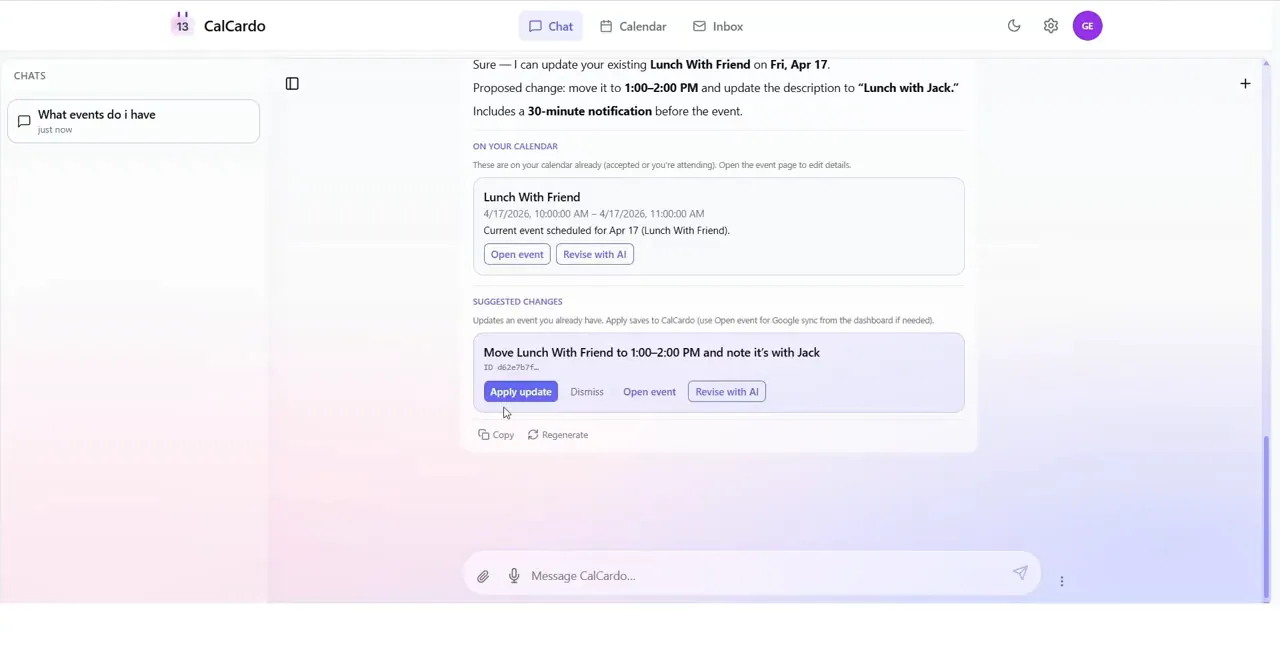
For an edit, CalChat showed the existing event separately from the proposed patch. Nothing changed until I pressed Apply update. 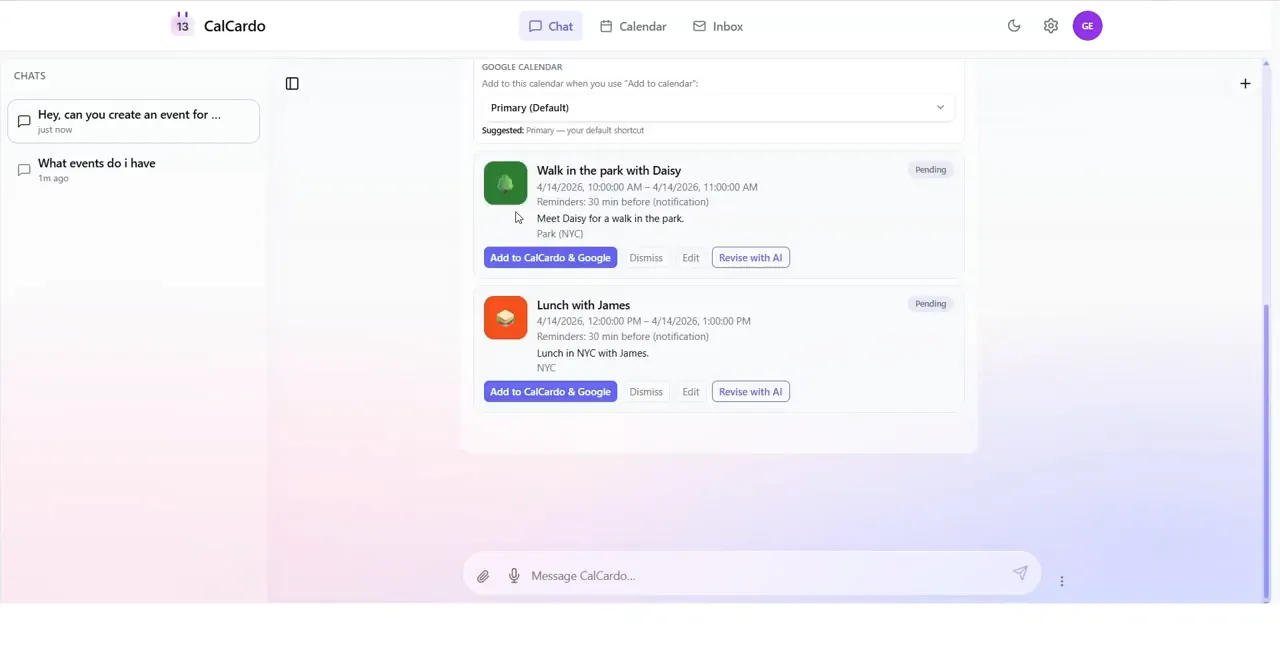
One request could produce multiple structured drafts. Each event could be added, dismissed, edited manually, or revised with AI. 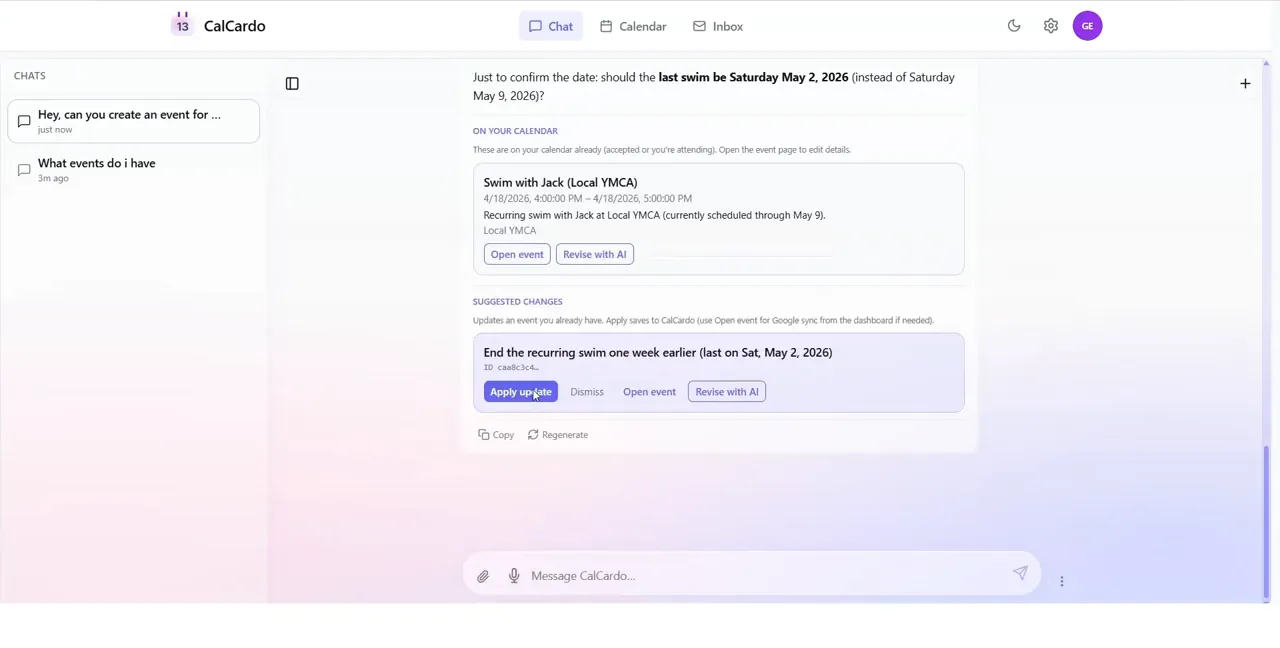
Recurring events were handled as real recurrence changes. Here the assistant proposed ending a swimming series one week earlier while preserving the earlier dates.
From Gmail to a calendar event
The email side became a staged pipeline rather than one large AI call. Gmail messages were ingested, scored by a heuristic filter, sent to an extraction model only when they looked calendar-related, converted into a canonical event record, and placed in an in-review state. The later code also includes duplicate detection, update and cancellation proposals, and configurable auto-accept rules.
Keeping the steps separate made failures easier to inspect and reduced unnecessary model calls. Rejected messages could have their body and snippet removed to limit retention, and CalChat was grounded on the resulting event fields rather than raw email bodies.
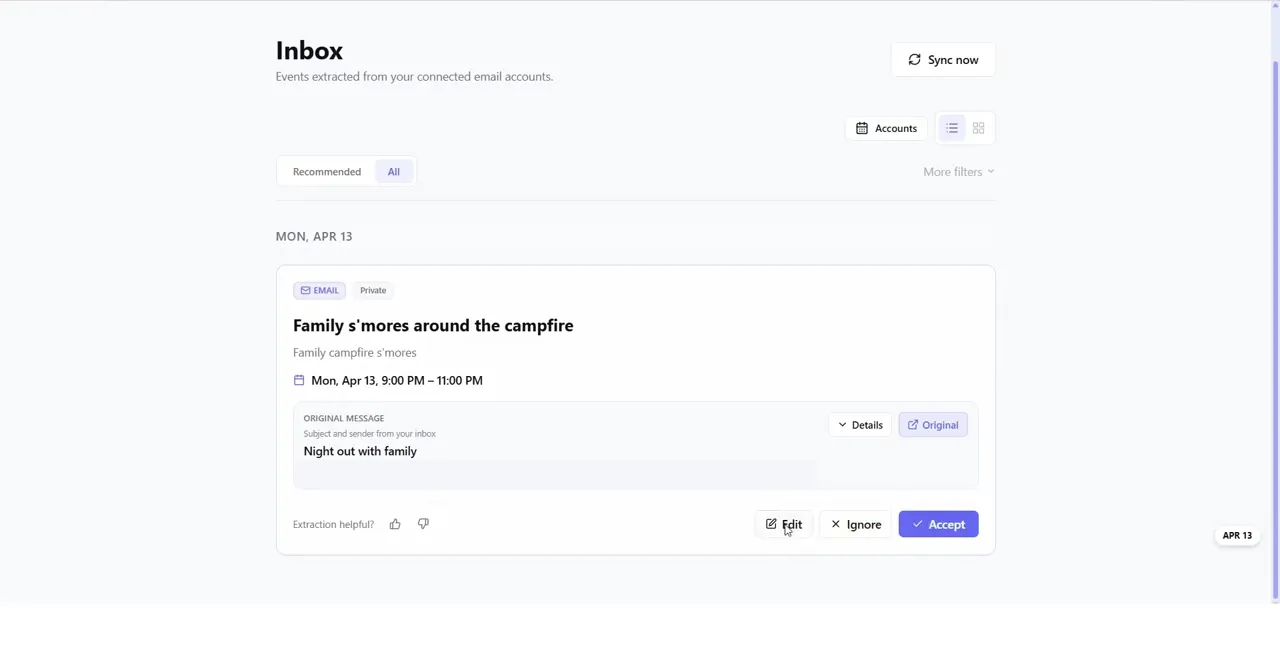
The Gmail pipeline extracted a two-hour campfire event, preserved a link to the source message, and placed it in a review queue instead of adding it automatically. The sender line has been removed from this portfolio screenshot. 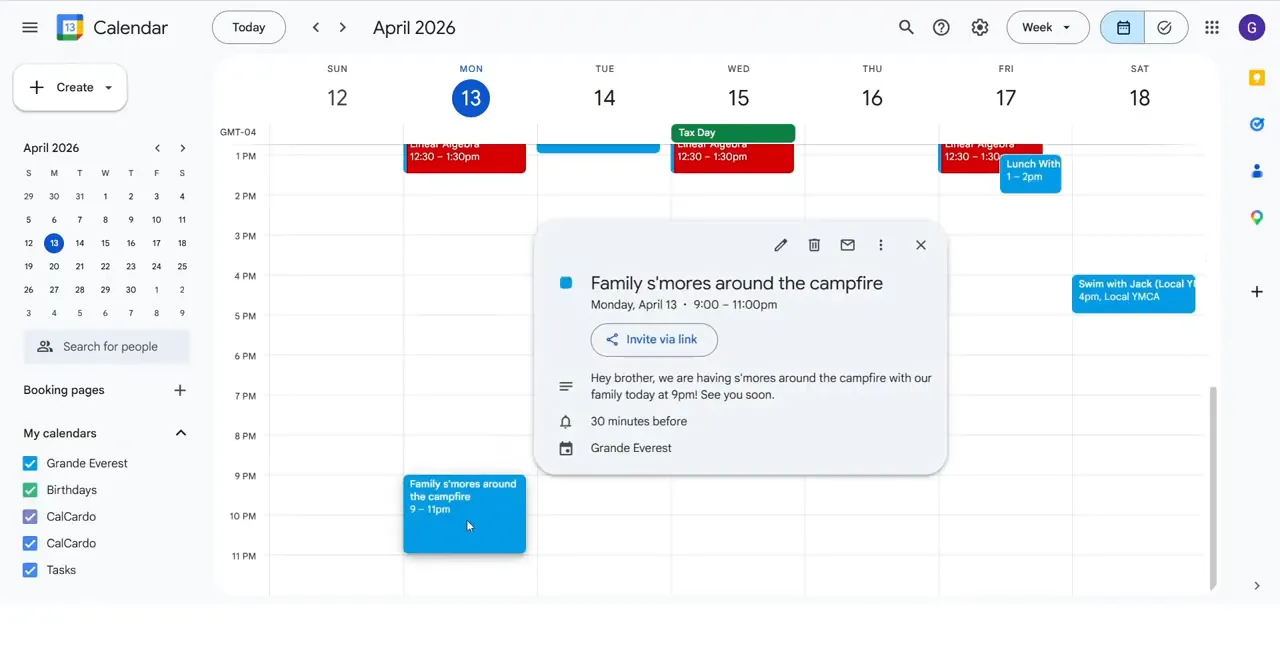
After I accepted the proposal, the extracted event appeared in Google Calendar with its time, description, calendar, and reminder intact.
Full-stack architecture
The frontend is a React 19 single-page app built with TypeScript, Vite, React Router, and Tailwind CSS. The Python backend is one FastAPI service split across 17 API routers for events, chat, Google connections, email processing, billing, storage, administration, and the other product areas.
Supabase provides authentication, Postgres, and private file storage. The browser signs in through Supabase and sends its JWT to FastAPI, which validates the token before handling protected requests. The database layer uses the Supabase PostgREST client, and the migrations apply row-level security to user-owned data.
The Google integration handles Calendar import and write-through updates, while Gmail can use Pub/Sub notifications or a manual sync. The code also includes Stripe subscriptions, feature entitlements, request IDs, rate limiting, error capture, and an append-only AI usage ledger that records token use and estimated cost for chat, summarization, filtering, extraction, attachments, and transcription.
React + TypeScript
        |
        | Supabase JWT
        v
FastAPI API (17 routers)
        |
        +--> Supabase: Auth, Postgres, Storage
        +--> Google Calendar: import and write-through
        +--> Gmail: ingest, filter, extract, review
        +--> OpenAI: chat, vision, extraction
        +--> Stripe: plans and entitlements
Building it with AI
I built early versions first, then used AI heavily while revising the product into something polished enough for friends to test. The most useful approach was to treat the AI like another intern: give it one bounded part of the system, enough context to understand that part, tests or a concrete way to verify the result, and feedback before moving on.
The project taught me that AI does not replace system design. I still had to decide how calendar data should move through the product, where approval boundaries belonged, how the services fit together, and how to break a large idea into pieces the model could work on safely. The better I understood the architecture, the more useful the AI became.
Why I paused it
Getting broad Google Calendar and Gmail access verified was a tedious final step. At the same time, general AI products started covering the basic use case of chatting with a calendar, which made the original idea less distinctive than it had been when I first thought of it.
CalCardo still had useful details, especially its review queue and its ability to recognize that a new email might update or cancel an existing event. I decided those narrower advantages were not enough to justify taking the entire product further, so I moved on to ideas where I saw more room to build something different.
Demo
The linked walkthrough covers account setup, Google Calendar authorization, calendar shortcuts, importing a date range, editing and syncing events, creating and revising events through CalChat, recurring schedules, Gmail connection, and reviewing an event extracted from a real email. The deployed frontend is still online, but the backend is currently turned off.